

Screen
Events for controlling screen-level settings such as VDP configuration, HBlank/VBlank scripts, and fade effects.
Actions
Fade Palette In
Fade the selected palette from blank.Fade Palette In
Palette Slot
PAL0 (Background)
Duration
0.5
Wait until finished
- Palette Slot: The palette slot you want to use.
- Duration: The length of time needed to perform the fade in seconds or frames.
- Wait until finished: Set if script should pause until fade has finished.
Fade Palette Out
Fade the selected palette to blank.Fade Palette Out
Palette Slot
PAL0 (Background)
Duration
0.5
Wait until finished
- Palette Slot: The palette slot you want to use.
- Duration: The length of time needed to perform the fade in seconds or frames.
- Wait until finished: Set if script should pause until fade has finished.
VDP Tiles Setup
OnStart/OnEnd: Change how the VDP Tiles are distributed.VDP Tiles Setup
VPD Tile Setup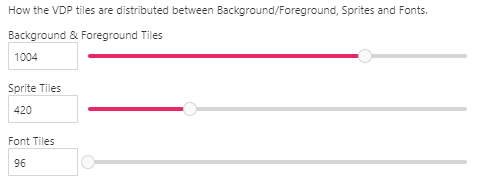
- VPD Tile Setup: How the VDP tiles are distributed between Background/Foreground, Sprites and Fonts.
VDP Tiles Restore
OnStart/OnEnd: Restore how the VDP Tiles are distributed to the project default settings.VDP Tiles Restore
OnStart/OnEnd: Restore how the VDP Tiles are distributed to the project default settings.
Blanks
Blank: If Scanline Is
Conditionally run part of the script if the current scanline number match the given value.Blank: If Scanline Is
Scanline Counter
0
True
- Scanline Counter: Number of scanlines between script calls.
Blank: Palette Set Color
Change the selected color from the selected palette to the values given. This event is only usable for HBlank scripts.Blank: Palette Set Color
Palette Slot
PAL0 (Background)
Color Index
0
Color
R
255
G
255
B
255
- Palette Slot: The palette slot you want to use.
- Color Index: The color index to use inside the palette.
- Color
Blank: Palette Set Color From Palette
Change the selected color from the selected palette to the selected one.Blank: Palette Set Color From Palette
Palette Slot
PAL0 (Background)
Color Index
0
Palette to copy the color from:
Palette
0: Palette 0
Color Index
0
- Palette Slot: The palette slot you want to use.
- Color Index: The color index to use inside the palette.
- Palette: The new palette to use.
- Color Index: The color index to use inside the palette.
Blank: Scroll Set Value
Set the plane scroll to a new value.Blank: Scroll Set Value
Plane
Plane B (Background)
Direction
Horizontal
Value
0
This event only sets the plane scroll mode, tile and line modes can't be updated during HBlank.
- Plane: The plane we want to use
- Direction: The scroll direction to set.
- Value: The value you want to set.
Blank: Window Plane Disable
Disable Window Plane.Blank: Window Plane Disable
Disable the Window Plane
Blank: Window Plane Enable
Enable Window Plane with the given parameters.Blank: Window Plane Enable
Stick X
Left
Width
40
Stick Y
Bottom
Height
8
- Stick X: The side of the screen to stick on the X axis.
- Width: The width to draw the window.
- Stick Y: The side of the screen to stick on the Y axis.
- Height: The height to draw the window.
OnStart: Set Horizontal Blank Script
Run the specified script after during a tiny pause in drawing each line, useful for simple palette or scroll tricks. Only events that are labeled with 'Blank:' or 'VBlank:' can be used.OnStart: Set Horizonal Blank Script
Run the specified script after during a tiny pause in drawing each line, useful for simple palette or scroll tricks. Only events that are labeled with 'Blank:' or 'VBlank:' can be used.
Scanline Counter
0
On Horizontal Blank
On Horizontal Blank
- Scanline Counter: Number of scanlines between script calls.
- On Horizontal Blank: The script to run when during the Horizontal Blank.
OnStart: Set Vertical Blank Script
Run the specified script after during a tiny pause in drawing the screen, useful to restore palette and scroll changes. Only events that are labeled with 'Blank:' or 'HBlank:' can be used.OnStart: Set Vertical Blank Script
Run the specified script after during a tiny pause in drawing the screen, useful to restore palette and scroll changes. Only events that are labeled with 'Blank:' or 'HBlank:' can be used.
On Vertical Blank
On Vertical Blank
- On Vertical Blank: The script to run when during the Vertical Blank.
Scene Disable Blank Scripts
Disable the Verital & Horizonal Blank scripts.Scene Disable Blank Scripts
Disable the Verital & Horizonal Blank scripts.
Scene Enable Blank Scripts
Enable the Verital & Horizonal Blank scripts.Scene Enable Blank Scripts
Enable the Verital & Horizonal Blank scripts.
Set HBlank Scanline Counter
Set the number of scanlines between HBlank script calls.Set HBlank Scanline Counter
Scanline Counter
0
- Scanline Counter: Number of scanlines between script calls.
VBlank: Scroll Restore
Restore the original camera scroll on the given plane.VBlank: Scroll Restore
Plane
Plane B (Background)
Direction
Horizontal
This event will be needed to avoid strange artifacts when modifying the scroll during HBlank.
- Plane: The plane we want to use
- Direction: The scroll direction to set.
Planes
Plane Clear
Clear the entire content drawn on the selected plane. Optionally reset its scroll values.Plane Clear
Plane
Plane B (Background)
Reset Scroll
- Plane: The plane we want to use
- Reset Scroll: Also reset the scroll values and parallax state for this plane.
Window Plane Enable
Enable Window Plane with the given parameters.Window Plane Enable
Stick X
Left
Width
40
Stick Y
Bottom
Height
8
- Stick X: The side of the screen to stick on the X axis.
- Width: The width to draw the window.
- Stick Y: The side of the screen to stick on the Y axis.
- Height: The height to draw the window.
Window Plane Disable
Disable Window Plane.Window Plane Disable
Disable the Window Plane
Properties
Hilight / Shadow Enable
Enable Hilight / Shadow effect.Hilight / Shadow Enable
Enable Hilight / Shadow effect
Hilight / Shadow Disable
Disable Hilight / Shadow effect.Hilight / Shadow Disable
Disable Hilight / Shadow effect