

Exporter Features
There are several advanced features included in the MD Engine exporter that can be enabled with some events, you can check all on the Platform events section.
This includes the following:
- Achievements
- Platform Detection
- Input Inverted Mode
- Wide Screen Mode (16:9 aspect ratio)
- Toggle Fullscreen Mode
- Toggle 4:3 Window
- Toggle CRT Effect
- Close Game Request
Achievements
This is supported on the Desktop Export only when enabling Steam.
You can check the Unlock Achievement event information to know more.
Platform Detection
This is supported on both debugger, Web Export, and Desktop Export, it helps check the platform the game is running on.
You can check the If Running on Platform event information to know more.
Input Inverted Mode
This should be ON only on Japanese PS4 consoles if we should invert the UI button displays of Cross and Circle.
You can check the If Input Inverted Mode is Enabled event information to know more.
Toggle Wide Screen Mode
This is supported on the debugger, Web Export, and Desktop Export, it makes the game render in 16:9 aspect ratio.
If you are using the H40 mode, instead of having a 320px x 224px screen area you will have a 400px x 224px screen area.
This works by rendering more content on the right side of the screen.
Here you can see an example:
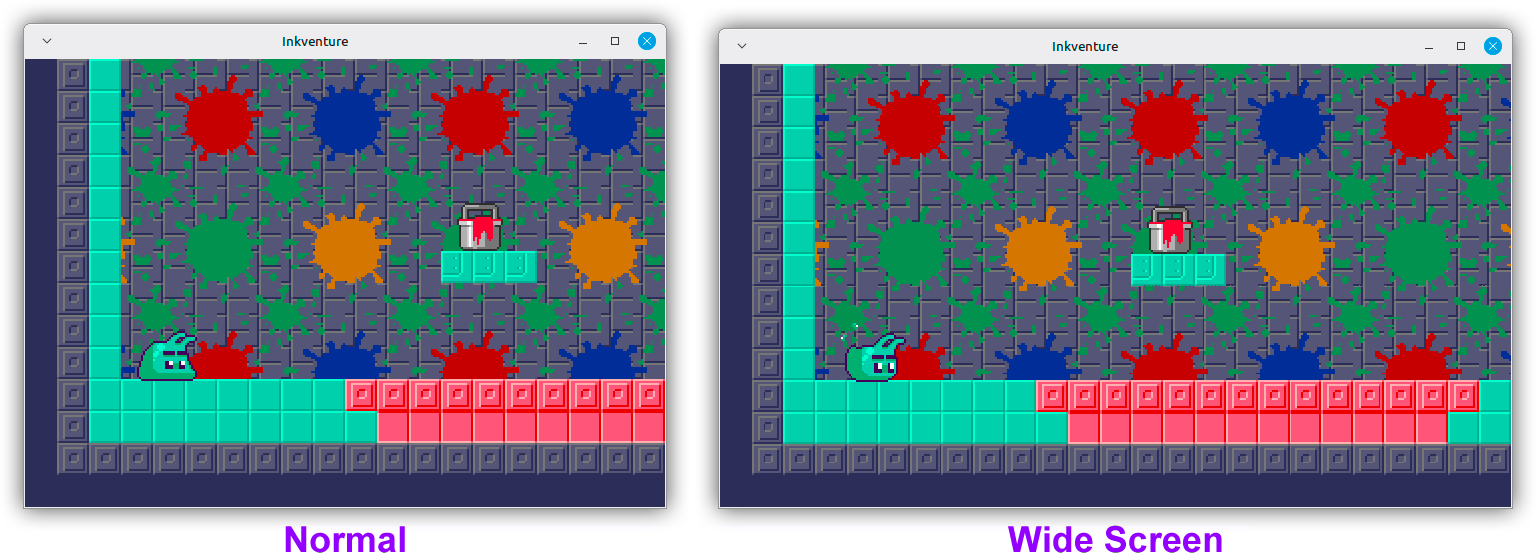
You can check the Toggle Wide Screen Mode event information to know more.
Toggle Fullscreen Mode
This is supported on the Desktop Export only, it toggles the window fullscreen mode.
You can check the Toggle FullScreen Mode event information to know more.
Toggle 4:3 Window
This is supported on the Desktop Export only, it makes the window occupy a 4:3 area instead of a usual 16:9 area with black borders.
You can check the Toggle 4:3 Window event information to know more.
Toggle CRT Effect
This is supported on the Desktop Export only, it toggles a CRT shader effect.
You can check the If Running on Platform event information to know more.
Close Game Request
This is supported on the Desktop Export only, it notifies the game close has been requested.
You can check the Close Game event information to know more.
Enhanced Mode
This is supported on the Desktop Export only, it toggles the enhanced mode.
This mode disables the sprite limit and allows to render the Plane A (Foreground) under the Window Plane so dialogue windows look better.
You can check the Toggle Enhanced Mode event information to know more.
Toggle Rewind
This is supported on the debugger, Web Export, and Desktop Export, it toggles the rewind support.
You can check the Toggle Rewind event information to know more.
Notify Game Completed
This is supported on Desktop Export only, it notifies the runtime the game has been completed.
It allows for special achievement unlocks and such if desired, depending on the runtime implementation.
You can check the Notify Game Completed event information to know more.